
Use your own link domain
By default the links in your notifications go to Parasend's domain. With your own link domain, such as delivery.yourcompany.example, recipients see your domain instead, which builds trust. Parasend takes care of the certificate.
Who can do this: the owner and admins. Your own link domain comes with Plan 1 and up. You need access to your domain's DNS.
Add a link domain
- Open My domains. Under Add a domain, type a subdomain, for example delivery.yourcompany.example (not the domain itself, which can't hold a CNAME record), and click Add. You confirm it's you.
- Click Show the DNS records and publish both records where your DNS is hosted:
- a TXT record, which proves the domain is yours, and
- a CNAME record, which points the domain at Parasend.
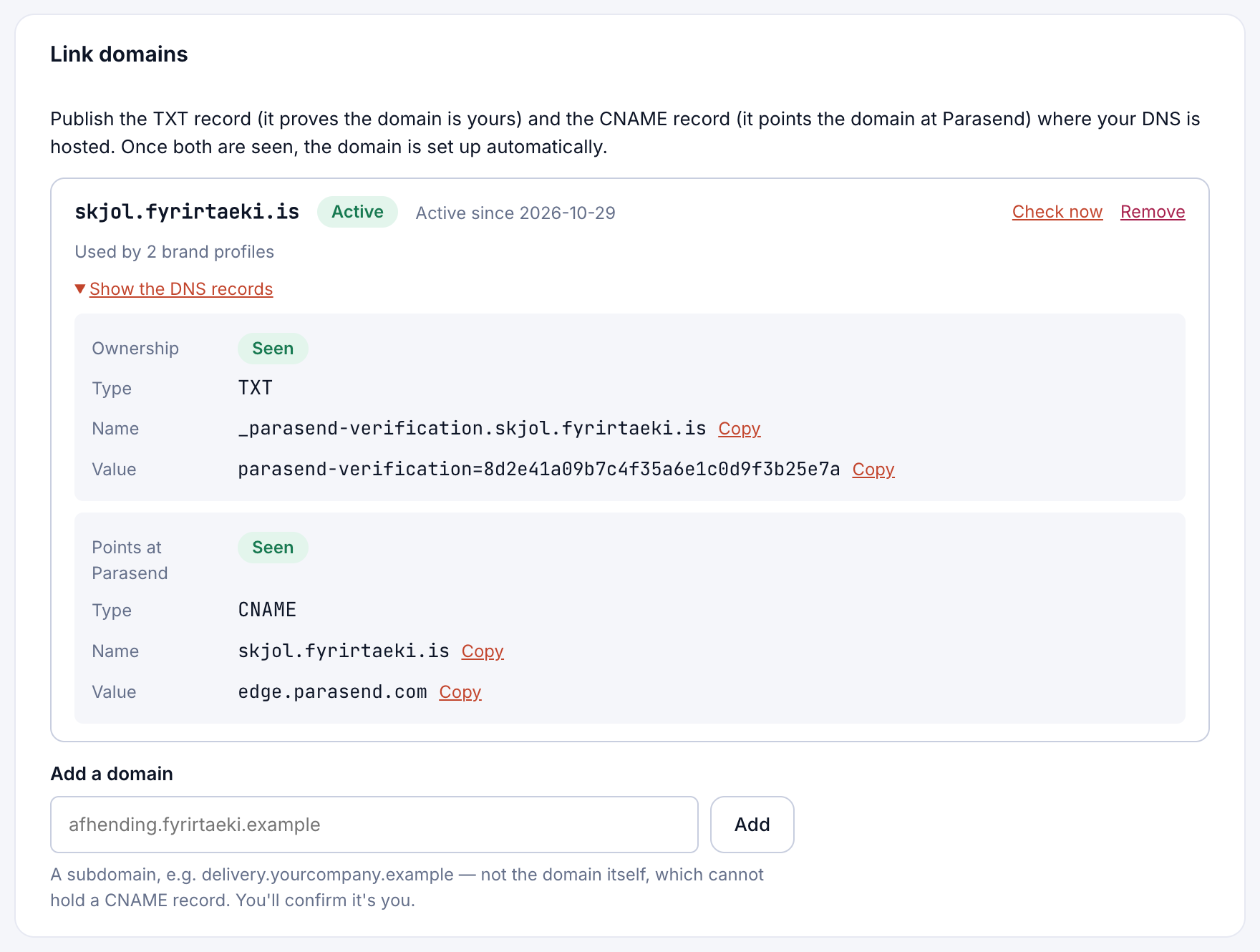
- Parasend checks the domain every 15 minutes, or click Check now. Once both records are seen, the domain is set up automatically and shows as Active.
Use it
Open a brand profile and choose the domain under Link domain, then save. Links in new deliveries with that profile go to your domain.

If your link domain stops working (for example after a DNS change), Parasend asks before sending whether to use Parasend's links instead. Reminders wait for the domain for up to 72 hours, then go with Parasend's link.